

فرامل الضغط ESA S875: دليل تحديث البيانات العملي
برمجة مكالمة S875 التابعة لوكالة الفضاء الأوروبية (ESA S875) بالضغط على الفرامل تصبح أكثر كفاءة بكثير عندما يفهم المشغلون كيفية تحديث البيانات العامة بشكل صحيح. في شبيبة راغوس, نرى هذه الخطوة أكثر من مجرد إجراء في وحدة التحكم. وهي طريقة عملية للحفاظ على نتائج الانحناء متوافقة مع ظروف الإنتاج الحقيقية, خاصة عندما يكون مادة, تولنج, أو تغير متطلبات الزوايا.
في العمل اليومي على الصفائح المعدنية, حتى اختلافات صغيرة في المعلمات يمكن أن تؤثر على اتساق الزاوية, التكرار, ووقت الإعداد. سمك المادة, اختيار الأدوات, سلوك الارتداد, وكل التأثيرات على الجانب النهائي. تظهر إرشادات الصناعة أيضا أن نتيجة الانحناء مرتبطة ارتباطا وثيقا بسماكة المادة, نصف قطر الداخل, والتحكم في النوابض, ولهذا السبب لا ينبغي أبدا التعامل مع بيانات General كعنصر ثانوي في القائمة.
لماذا تهم بيانات ESA S875 على فرامل الضغط على الفرامل
بالنسبة للعديد من المستخدمين, جنرال داتا هي المركز التشغيلي لبرنامج الثني. يخبر المتحكم بكيفية تفسير المهمة قبل أن يقوم الجهاز بتنفيذ الانعطاف. عندما تكون هذه القيم محدثة, يمكن للآلة الاستجابة بشكل أفضل وأكثر اتساقا. عندما تصبح قديمة, أخطاء البرمجة, إعادة العمل, وأصبح الوقت الضائع أكثر احتمالا.
من منظور JS RAGOS, يستفيد العملاء من فهم هذا المنطق مبكرا:
• تربط البيانات العامة خصائص المواد بسلوك حساب الانحناء
• يساعد في مواءمة معلومات الأدوات مع ظروف الورشة الحقيقية
• يدعم تصحيحا أسرع عند تغير متغيرات الإنتاج
• يقلل من التكرار غير الضروري عبر المنعطفات المشابهة
وهذا أيضا سبب أهمية منصات التحكم الحديثة لأنظمة التحكم في ESA في بيئات فرامل الضغط الاحترافية. تسلط ESA الضوء على قدرة CNC المتقدمة على فرامل الضغط, بما في ذلك أداء برمجة قوي وتحكم متعدد المحاور في مجموعة S875, يظهر أن المنصة مخصصة للاستخدام الصناعي الصعب وليس فقط للتعديل اليدوي.
كيفية الوصول إلى قناع بيانات ESA S875 Press Brake General
تبدأ عملية التحديث بالوصول الصحيح إلى الواجهة الصحيحة. على ESA S875 اضغط فرامل, لا يحتاج المشغلون إلى المرور عبر قوائم غير مرتبطة لبدء تصحيح البيانات العامة. مسار الوصول مباشر ومنظم, وهذا يساعد في تقليل التردد أثناء الإعداد.
استخدم المسار التالي:
• فتح قناع الإعدادات
• اضغط على زر القائمة في وحدة التحكم
• اختر الخيار 6: البيانات العامة
• افتح قناع البيانات العامة على الشاشة
تحتوي هذه الشاشة على نفس هيكل البيانات الذي يحتوي عليه سياق الانحناء الحالي, لذا من السهل نسبيا التعرف عليه ومراجعته. للمشغلين ومديري الإنتاج, وهذا مهم لأن واجهة المألوفة تقلل من خطر تعديل الحقل الخاطئ تحت ضغط الوقت.
في شبيبة راغوس, نوصي العملاء بتدريب المشغلين على التعرف على هذا المسار كجزء من الانضباط البرمجي القياسي. عملية الدخول السريعة مفيدة, لكن الإدخال الصحيح أهم بكثير.
كيفية قراءة واجهة البيانات العامة بشكل صحيح
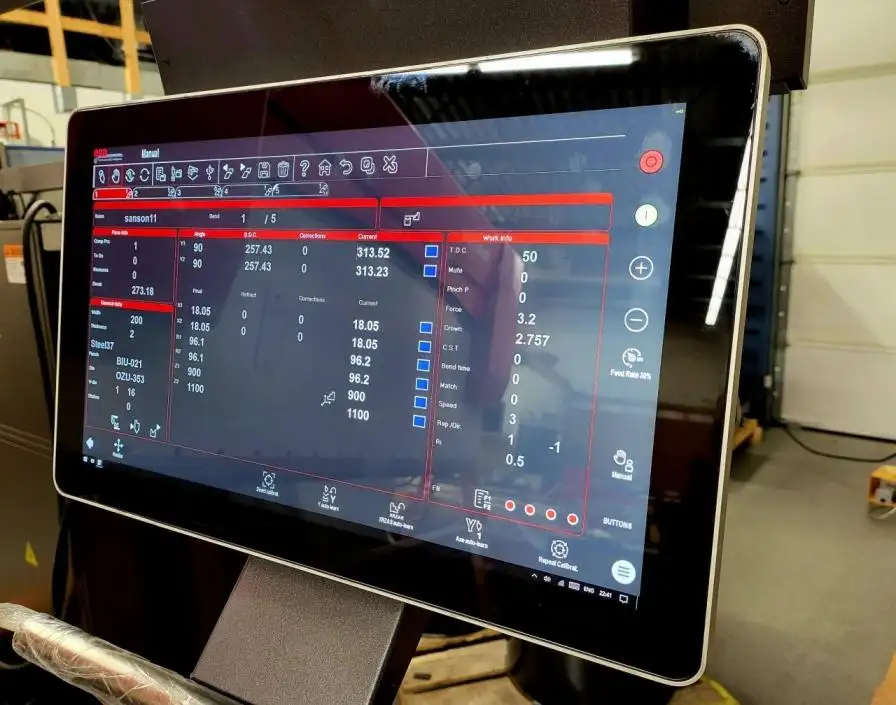
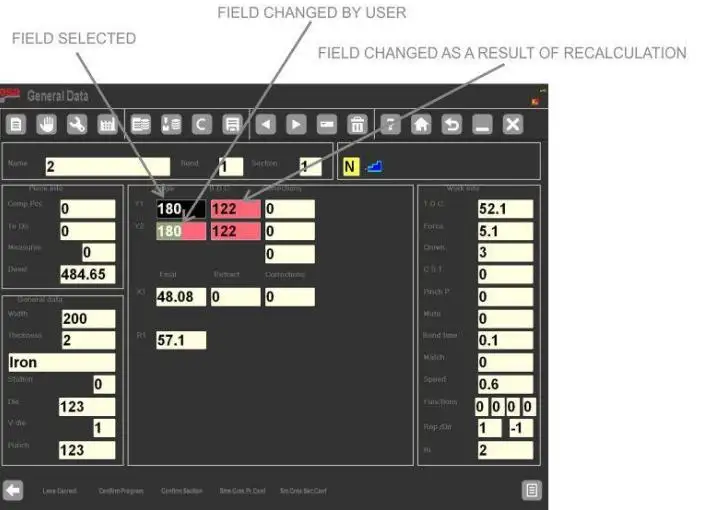
بمجرد فتح قناع البيانات العام, الأولوية التالية هي التفسير. بدلا من أن يكون مجرد قائمة بسيطة من الإعدادات, كما توفر الشاشة تغذية راجعة بصرية واضحة. يتيح للمستخدمين رؤية المعايير التي غيروها بأنفسهم وأي القيم أعاد التحكم حسابها بعد تلك التغييرات.
في معظم الحالات, تستخدم الواجهة قواعد الألوان التالية:
• الحقول المعكوسة الملونة تعرض القيم التي تم تغييرها يدويا
• تظهر حقول الخلفية الحمراء القيم التي أعاد النظام حسابها
• الحقول العادية تعرض بيانات تبقى دون تغيير
تساعد هذه التغذية الراجعة البصرية المشغل على تقييم نتيجة التعديل قبل قبوله. وهذا مفيد بشكل خاص عند تحديث سمك المادة, قيم المقاومة, بيانات التثقيب, أو معلومات عن النرد.
يجب أن تكون نقطة مهمة مفهومة بوضوح: الانحناء المعروض في قناع البيانات العامة هو نسخة مؤقتة, وليس انحناء الإنتاج النشط نفسه. هذا يمنح ESA S875 Press Brake سير عمل تصحيح أكثر أمانا. يمكن للمشغلين فحص التغييرات المحتملة قبل تطبيقها على البرنامج الفعلي.
في التصنيع الحقيقي, هذا عملي للغاية. يمكن أن تغير النوابغ وهندسة الأدوات طريقة تصرف الانحناء, وتشير مراجع الانحناء المهنية أيضا إلى أن اختيار الأدوات وهندسة الانحناء يؤثران مباشرة على النتيجة.
كيفية تطبيق تغييرات الضغط على فرامل ESA S875 بكفاءة
ميزة رئيسية لجهاز الضغط على فرامل ESA S875 هي أن تغييرات البيانات العامة لا تحتاج إلى تكرار انحناء تلو الآخر عندما ينطبق نفس المنطق عبر البرنامج. يوفر المتحكم عدة مفاتيح تأكيد حتى يتمكن المشغلون من تعديل التغييرات مع التحكم.
الخيارات الأربعة الرئيسية للتأكيد هي:
• تأكيد البرنامج: تطبيق التغييرات على جميع الانحناءات في البرنامج الكامل
• قسم التأكيد: تطبيق التغييرات على جميع الانحناءات في القسم الحالي
• مؤتمر. نفس الرقم. ال.: تطبيق تغييرات على الانحناءات ذات نفس زاوية Y1 في البرنامج
• مؤتمر. نفس الطائفة. ال.: تطبيق تغييرات على الانحناءات ذات نفس زاوية Y1 في المقطع الحالي
يساعد هذا الهيكل في سيناريوهات إنتاج مختلفة.
على سبيل المثال, عندما يستخدم قسم واحد نفس المادة وإعداد الأدوات, قسم التأكيد يمكن أن يوفر وقت البرمجة. عندما تتطلب الانحناءات ذات الزاوية المتطابقة فقط التوحيد القياسي, توفر مفاتيح التأكيد المعتمدة على الزاوية طريقة أكثر انتقائية. هذا يقلل من احتمال الإفراط في تطبيق التصحيحات على الانحناءات غير المرتبطة.
في شبيبة راغوس, نقدم هذا كميزة إنتاجية وليس فقط كوظيفة وحدة تحكم. للعملاء, الفائدة العملية بسيطة: مدخلات أقل تكرارا, أخطاء أقل يمكن تجنبها, وإعداد أسرع عبر أجزاء متشابهة.
أفضل الممارسات لتحديثات البيانات الآمنة والدقيقة
التحرير السريع مفيد, لكن التحرير المنضبط يقدم القيمة الحقيقية. يجب أن يجمع روتين تحديث البيانات المهني بين السرعة والتحقق.
نوصي بسير العمل التالي لمستخدمي ESA S875 Press Brake:
• خطط للتصحيح قبل فتح القناع
• تغيير الحقول المطلوبة فقط لمشكلة الإنتاج الحالية
• راجع الحقول المعكوسة والحمراء قبل التأكيد
• استخدم أضيق نطاق تأكيد يناسب المهمة
• اختبار جزء عينة واحد بعد تغيير مهم
• تسجيل التحديث للوظائف المتكررة المستقبلية
ومن الممارسات الجيدة أيضا إلغاء التغييرات عندما يكون هناك حالة من عدم اليقين. تساعد وظيفة تجاهل التصحيحات المشغلين على إزالة التعديلات المؤقتة دون تعطيل هيكل البرنامج الأصلي. وهذا يعد ضمانا قويا في الورش المزدحمة حيث تكون المقاطعات شائعة.
عادة مفيدة أخرى هي مراجعة البيانات العامة كلما تغيرت المواد أو الأدوات. إرشادات الصناعة حول أساسيات الانحناء تظهر مرارا وتكرارا أن نصف قطر الانحناء, السلوك المادي, واختيار الأدوات ليسا عوامل معزولة. يعملان معا, لذا يجب أن تعكس بيانات وحدة التحكم الإعداد الحقيقي على الأرض.
كيف يدعم JS RAGOS تشغيل الضغط الأفضل لفرامل ESA S875
في شبيبة راغوس, نحن نؤمن بأن العملاء يجب ألا يقتصروا على شراء نظام فرامل الضغط فقط. يجب عليهم أيضا اكتساب المعرفة لاستخدامها بثقة. لهذا السبب فإن التوجيه العملي لوحدة التحكم مهم. عندما يفهم المشغلون كيفية تحديث بيانات ESA S875 العامة بشكل صحيح, يمكنها تقليل وقت التوقف, حافظ على اتساق الانحناء, والاستجابة بشكل أكثر فعالية لمتطلبات الوظائف المتغيرة.
للعملاء, القيمة العملية واضحة:
• محاذاة أفضل بين بيانات وحدة التحكم والإنتاج الفعلي
• جودة انحناء أكثر استقرارا عبر المهام المتكررة
• تصحيح أسرع عند تغير ظروف المواد أو الأدوات
• تقليل خطر حدوث ارتباك في البرمجة أثناء الإعداد
تم تصميم عائلة وحدات التحكم الأوسع ESA S875 للعمل المتقدم على فرامل الضغط, بما في ذلك وظائف برمجة قوية ودعم للتحكم المعقد في الآلة, ولهذا السبب تستحق إدارة البيانات بشكل صحيح التعلم بطريقة منظمة.
إذا كان فريقك يعمل مع ESA S875، اضغط على الفرامل ويريد سير عمل تحديث أكثر موثوقية, هذا هو الوقت المناسب لتوحيد طريقة البرمجة الخاصة بك. تواصل مع JS RAGOS للحصول على الدعم الفني, آلة الاستشارات, أو إرشادات عملية أكثر حول تشغيل وحدة التحكم في وكالة الفضاء الأوروبية. عملية تحديث البيانات المدارة جيدا هي خطوة صغيرة يمكن أن تحقق تحسنا ملحوظا في دقة الانحناء, كفاءة البرمجة, واستقرار الإنتاج.